If you’ve ever looked at your website logs and seen a flood of traffic from weird IP addresses, you’ve met Google’s “User Agents.”
If Google cannot crawl your site efficiently, your content doesn’t exist in their ecosystem. Conversely, if Google crawls too aggressively, your server performance can tank, leading to a poor experience for your human visitors.
This guide provides a deep dive into the mechanics of Google’s crawlers and fetchers, how they interact with your technical stack, and how you can manage them to ensure your most important pages are always visible.
1. Understanding the Google “Bot” Ecosystem
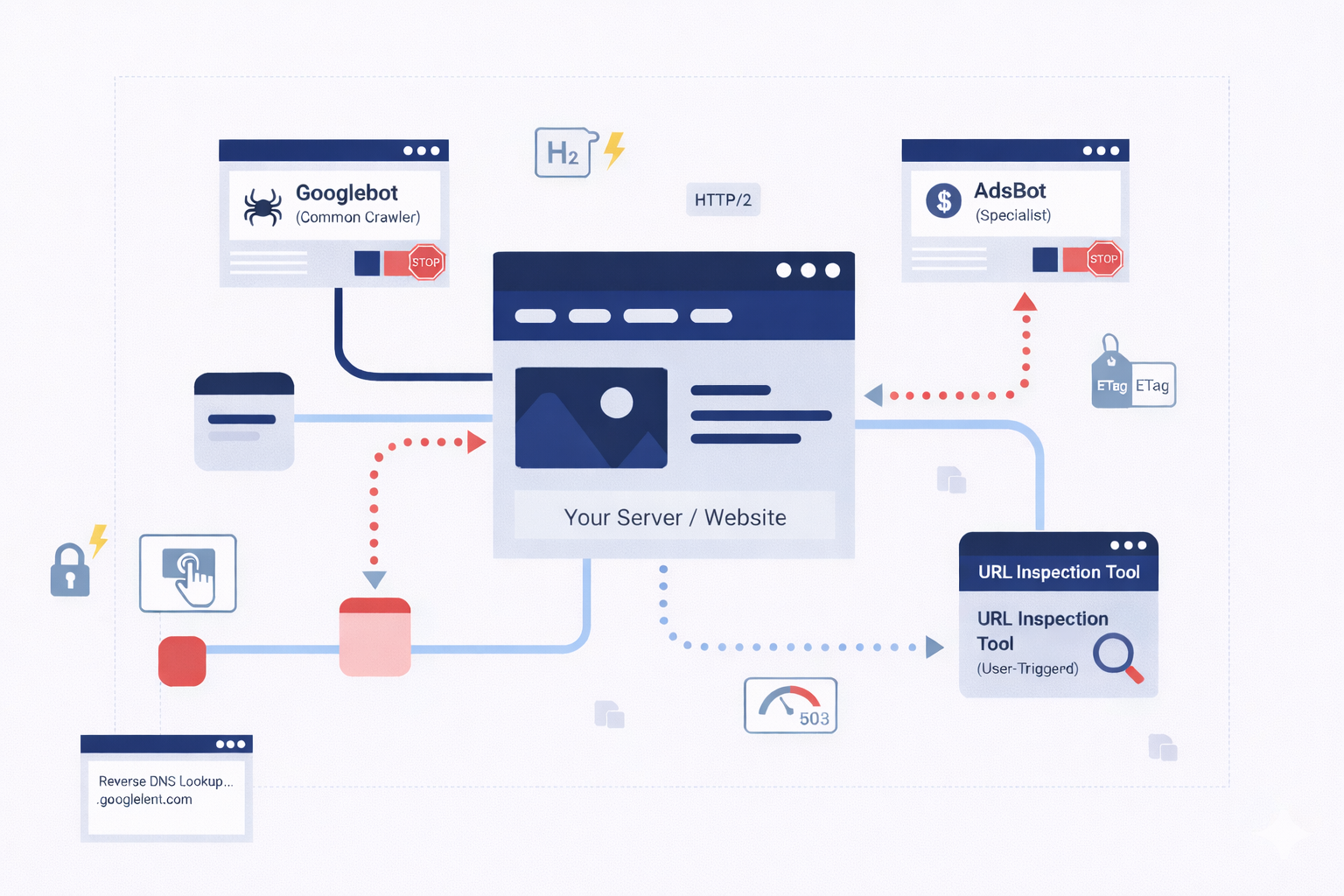
Not all visits from Google are the same. Google employs a sophisticated fleet of user agents, each with a specific mission. Understanding which one is hitting your server is the first step in effective management.
Common Crawlers (The Explorers)
The most famous of these is Googlebot. These crawlers are the workhorses of Google Search. Their job is to discover new pages, scan updated content, and follow links to build the global search index.
- Behavior: They are autonomous. They move from link to link and use internal algorithms to decide how often to return to a specific page.
- The Golden Rule: Common crawlers always respect the rules set in your robots.txt file. If you tell Googlebot to stay out of a directory, it will.
Special-Case Crawlers (The Specialists)
Sometimes, Google needs to crawl your site for a specific product rather than general search. A prime example is AdsBot.
- The Nuance: AdsBot needs to verify that your landing pages are high-quality and safe for users clicking on Google Ads. Because this is a specific service you’ve opted into, AdsBot might ignore a “disallow all” (*) rule in your robots.txt. It requires explicit permission or specific ad-related directives to be blocked.
User-Triggered Fetchers (The Tools)
These are not automatic. They only act when a human, usually you or your developer, clicks a button.
- Examples: The “URL Inspection Tool” in Search Console or the Google Site Verifier.
- Purpose: These act like a standard browser request (similar to tools like wget or curl). They make a single request to verify code or check a page’s live status.
2. The Infrastructure Behind the Crawl
Google’s crawling infrastructure is one of the most powerful distributed computing systems on earth. It is designed to scale as the web grows, which means it can hit your site from thousands of machines simultaneously.
Global Distribution & IP Addresses
To optimize bandwidth and reduce latency, Google’s crawlers are distributed across datacenters worldwide. Ideally, Google will try to crawl your site from a datacenter near your server’s physical location.
- The “US Egress” Rule: By default, Google egresses primarily from IP addresses in the United States.
- The Failover Mechanism: If Google’s system detects that your site is blocking U.S. traffic (perhaps due to a misguided firewall setting or geo-blocking), it won’t just give up. It will attempt to crawl your site from IP addresses located in other countries to determine if the site is truly down or just restricted.
Identifying Genuine Traffic
Because Google uses so many different IPs, you should never try to allowlist Google by individual IP addresses alone, they change too frequently. Instead, verify Googlebot by:
- User-Agent String: Checking the header for “Googlebot.”
- Reverse DNS Lookup: This is the only foolproof way. A legitimate request from Googlebot will always resolve to a .googlebot.com or .google.com domain.
3. Supported Transfer Protocols: HTTP/1.1 vs. HTTP/2
One of the most common questions for developers is: Does it matter which protocol I use for Googlebot?
Google supports both HTTP/1.1 and HTTP/2. However, the way they use them is purely based on efficiency.
Does HTTP/2 Help My Ranking?
The short answer is: No. There is no direct “ranking boost” for having your site crawled over HTTP/2. However, there are massive resource-saving benefits.
- Efficiency: HTTP/2 allows for multiplexing, meaning Google can request multiple files over a single connection. This reduces the CPU and RAM load on your server and Google’s machines.
- The Switch: Googlebot may switch between protocols between sessions based on which one performed better in the past.
How to Opt-Out
If for some technical reason your server struggles with HTTP/2 crawls, you can force Google back to 1.1 by instructing your server to respond with a 421 HTTP status code when accessed via HTTP/2. This tells Google, “I can’t handle this request on this protocol,” and it will retry via 1.1.
4. Content Encoding and Compression
Bandwidth is expensive. To keep the web fast, Google supports three main types of content encoding:
- Gzip: The industry standard.
- Deflate: An older, less common compression.
- Brotli (br): The modern gold standard for compression.
Googlebot will advertise what it can handle in the Accept-Encoding header. If your server supports Brotli, ensure it is enabled. Brotli typically results in smaller file sizes than Gzip, meaning Google spends less time downloading your page and more time moving through your queue.
5. Masterclass in HTTP Caching
HTTP Caching isn’t just for users; it’s one of the most powerful ways to manage your Crawl Budget. If you have a site with 100,000 pages, you don’t want Google downloading all 100,000 every day if only 10 have changed.
The Power of ETags
Google strongly recommends using ETags (Entity Tags). An ETag is a unique identifier (like a fingerprint) for a specific version of a page.
- How it works: Googlebot requests a page and your server sends an ETag. The next time Googlebot comes back, it sends that ETag back to you in an If-None-Match header. If the page hasn’t changed, your server sends a 304 Not Modified response.
- Why ETags? Unlike the “Last-Modified” header, ETags don’t rely on date strings, which are notorious for parsing errors and timezone confusion.
Last-Modified and If-Modified-Since
If you choose to use the Last-Modified header, you must be precise. The date must follow the HTTP standard format: Fri, 4 Sep 1998 19:15:56 GMT.
- Pro Tip: Combine this with the max-age directive in your Cache-Control header. This tells Google exactly how many seconds you expect the content to remain “fresh.”
6. Managing Crawl Rate and Host Load
What happens when Google crawls too much? If your site’s “Time to First Byte” (TTFB) spikes or your database starts locking up during a crawl, you have a “Host Load” problem.
The Fine Balance
Google’s goal is to crawl as much as possible without overwhelming you. Their algorithm automatically detects when a server is slowing down and will naturally throttle the crawl.
Manual Intervention
If the automatic throttling isn’t enough, you have two options:
- Search Console: You can manually request a lower crawl rate. This is a “hard” limit that stays in place for 90 days.
- HTTP Status Codes: This is the “soft” way. If your server is truly overwhelmed, returning a 503 (Service Unavailable) or 429 (Too Many Requests) tells Google to back off and try again later.
Warning: Never use a 403 (Forbidden) or 401 (Unauthorized) to stop a crawl. Google may interpret these as a sign that the content should be removed from the index entirely.
7. FTP and Rare Protocols
While 99.9% of the web is crawled via HTTP/S, Google’s infrastructure still supports FTP and FTPS. This is a legacy feature and is rarely used today, but it’s worth noting for developers managing older document repositories or specialized file servers. If you are hosting public-facing files via FTP, Google can still index them, provided they aren’t behind a login.
8. Troubleshooting the Crawl: A Checklist for Developers
If you notice that your most important pages aren’t appearing in Google Search, or if your server logs are showing excessive Googlebot activity, follow this troubleshooting flow:
Step 1: Verify the Bot
Perform a reverse DNS lookup on the IP addresses causing the high load. If they don’t resolve to a Google domain, you are being scraped by a third party pretending to be Google. Block them at the firewall level.
Step 2: Check Robots.txt
Ensure you aren’t accidentally blocking your own CSS or JavaScript files. Modern Googlebot needs to “render” your page like a browser to understand it. If you block the “skin” of the site, Google sees a broken page and may rank it lower.
Step 3: Analyze Caching Headers
Check your server response headers. Are you sending ETags? Is your Cache-Control set correctly? If Google is downloading the same unchanged homepage 500 times a day, your caching is broken.
Step 4: Review the “Crawl Stats” Report
Log into Google Search Console and navigate to the Crawl Stats report. This is the “heart rate monitor” for your site. It will show you exactly how many requests Google is making, the average response time, and any increase in 404 or 500 errors.
9. How to Verify if a Visitor is Actually Google
Sometimes, spammers pretend to be Google to get access to your site. To protect yourself, you can verify requests if a “visitor” is a real Google bot or a fake.
Google Crawler & Fetcher Quick Reference
| Type | What it does | Respects Robots.txt? | How to recognize it (DNS) |
| Common Crawlers | Automatically scans and indexes the web (e.g., Googlebot). | Yes | googlebot.com |
| Special-Case Crawlers | Used for specific products like Google Ads (e.g., AdsBot). | Varies | google.com |
| User-Triggered Fetchers | Runs only when a user asks (e.g., Site Verifier). | No | google.com or googleusercontent.com |
How to verify them:
- The Manual Way: If you only need to check one IP address, you can use a simple command-line tool (like a Reverse DNS lookup) to see if the name matches Google.
- The Automatic Way: If you have a huge site with lots of traffic, you can use a script to automatically cross-reference visitor IPs against Google’s official, public list of IP addresses.
10. Conclusion: The “Invisible” Side of SEO
Managing how Google interacts with your site is an ongoing process. It’s not a “set it and forget it” task. As your site grows from hundreds of pages to thousands, the efficiency of the crawl becomes just as important as the quality of the content.
By implementing HTTP/2, mastering ETag caching, and monitoring your crawl rate, you create a friction-less environment for Googlebot. When Google can crawl your site without “friction,” your content moves through the pipeline faster, your server stays stable, and your brand gets the visibility it deserves in the 2026 digital landscape.
At DigiXL Media, we handle the technical heavy lifting from ETag caching to crawl budget optimization to ensure Google indexes your site perfectly without slowing it down.
Is your site ready for the next big crawl? Check your headers today, or let our experts do the deep dive for you.