If your keyword report looks like alphabet soup, this update is for you.
Google has introduced Query Groups inside Search Console Insights, an AI-powered feature that bundles near-identical queries into unified topics.
Instead of wading through endless keyword variations, you can now see which themes drive clicks, spot intent-level shifts, and prioritize actions in one view, no exports, filters, or regex gymnastics needed.
What Are Query Groups?
Query Groups are a new AI-driven clustering system within Search Console Insights that groups similar search queries, including spelling variants and near-duplicates, under a single topical umbrella.
This change lets SEOs and content teams analyze performance by intent clusters instead of isolated keywords, cutting out the need for manual regex matching or keyword grouping spreadsheets.
Before this feature, you could only approximate this view by filtering or using external tools. Now, Google’s AI does the heavy lifting automatically.
Where to find it
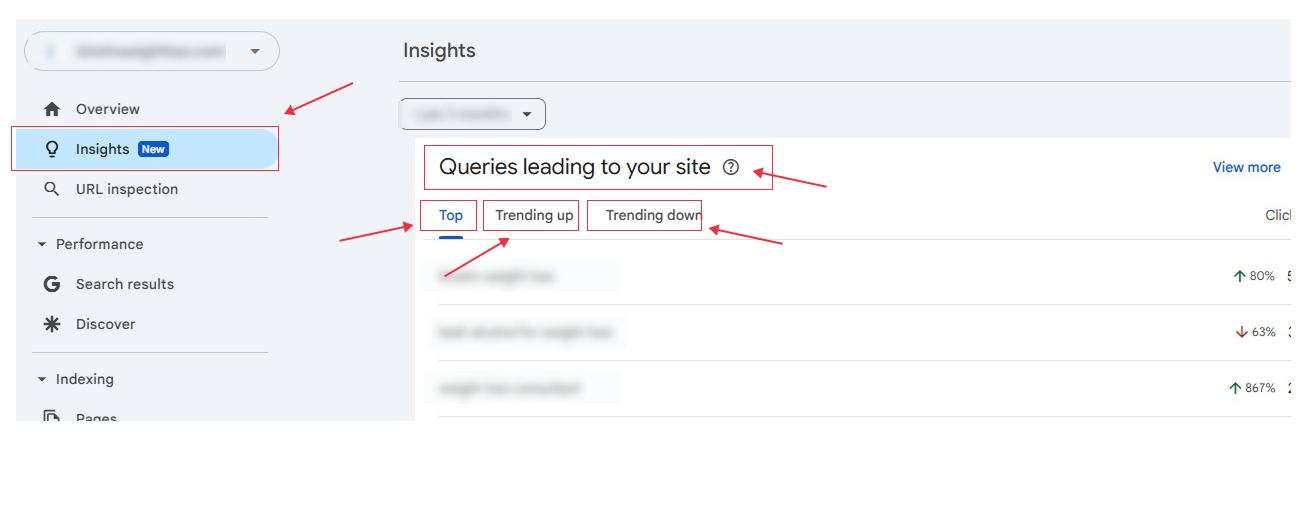
Open Search Console → Insights → “Queries leading to your site.” You’ll see a new card called Query Groups that organizes similar searches by topic.
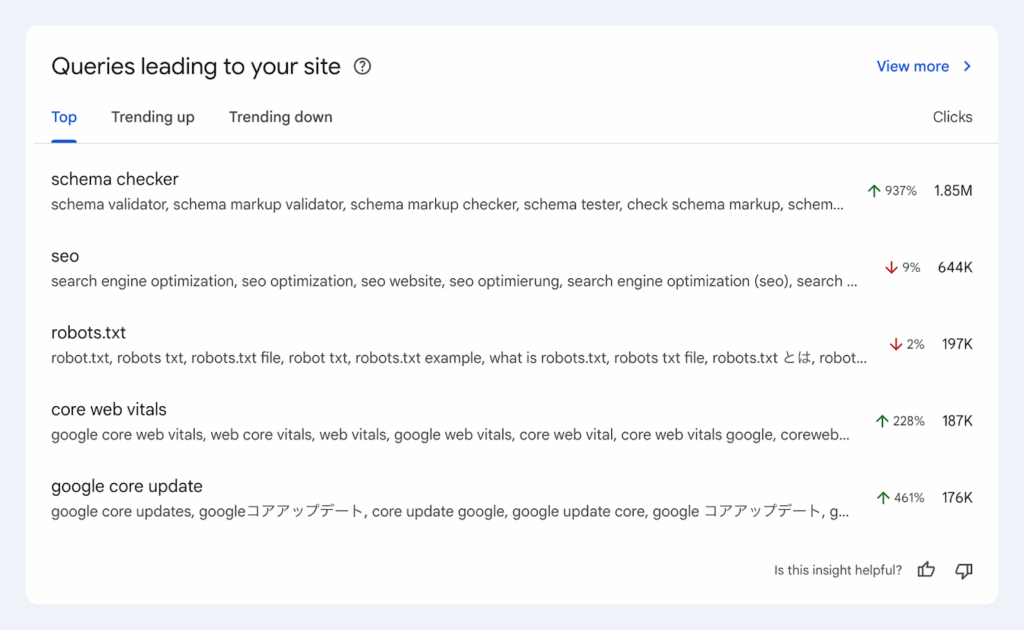
Here’s a quick preview of how the new Query Groups report appears in Search Console Insights.
What it shows
- Click totals for each query group.
- Indicators showing which groups are trending up or down.
- Representative queries inside each cluster.
Availability
Rolling out gradually. This feature is currently limited to properties with higher query volumes. Smaller sites may not see it yet, and remember, Search Console Insights itself is not available for all properties.
Who gets it first
High-traffic domains and sites with a diverse range of queries.
Why it matters
Query Groups shift the focus from keyword-level analysis to topic-level performance, making it easier to understand audience intent and content coverage at a glance.
Analyzing search data can be tricky because people ask the same thing in countless ways. Slight wording changes, misspellings, or even different languages can create dozens of variations for a single question, making it hard to see the bigger picture.
Take someone looking for tips on indoor plants. They might search:
- low-light indoor plants
- houseplants that need little sunlight
- easy-care indoor plants
- beginner indoor plants
- low maintenance houseplants
Each query is unique, but the intent is the same: finding indoor plants that are easy to care for. Trying to track all these variations manually can be overwhelming and slow down content planning.
This is where Query Groups come in. Google’s AI automatically clusters related queries into clear topic groups. Instead of a long, scattered list of individual searches, you get a high-level view of what your audience really cares about. These groups can evolve over time and are meant to provide actionable insights, they don’t affect your search rankings, just your understanding of user intent.
Step-by-Step: How to Use Query Groups
Get started with Google’s new Query Groups in minutes. Follow these quick steps to locate the feature, analyze grouped queries, and turn insights into SEO actions.
1. Open Insights
Go to Search Console, click Insights in the left menu.
2. Find the Card
Scroll to “Queries leading to your site.” You’ll now see Query Groups.
3. Review the Trends
Note total clicks per group and identify which topics are rising or falling. Screenshot or export key insights for weekly reporting.
4. Drill into Groups
Expand a group to see the representative queries driving traffic. Evaluate which pages are earning clicks for that intent.
5. Take Action
- Double down on winners: Add related FAQs, internal links, or supporting content around top-performing clusters.
- Fix overlap: If multiple pages compete within one group, consolidate URLs or clarify intent (e.g., guide vs pricing).
- Fill the gaps: If a cluster shows informational interest but lacks commercial content, add a bottom-of-funnel page.
- Track impact: Monitor group-level clicks and CTR over time, pairing with GA4 to measure conversions by intent.
6. Make it a routine
Add Query Groups to your weekly content ops or SEO sprint agenda — they’re perfect for identifying quick wins and keeping strategy aligned with audience trends.
Practical Use Cases
See how SEOs and content teams can apply Query Groups to uncover trends, refine clusters, and streamline performance tracking.
- Build or refresh topic clusters: Validate your existing content clusters (pillar + supporting articles) using Query Groups.
- Reduce keyword cannibalization: Identify pages competing for the same group and merge or reposition content.
- Optimize CTR: If a group has strong impressions but weak CTR, test improved titles or structured data.
- Content pruning: Spot groups with low engagement or outdated intent and merge or remove underperforming pages.
- Localization insights: Since groups capture spelling and language variations, you can spot regional interest early.
- Executive reporting: Present grouped insights by topic rather than showing raw keyword dumps, cleaner and easier to communicate.
What to Know Before You Compare Results
Before diving into your data, keep these factors in mind to ensure accurate comparisons and avoid misreading trends.
- Gradual rollout: Don’t worry if you don’t see it yet. It’s being rolled out in phases, starting with larger properties.
- Reporting shifts: Impression data since September 2025 may not be directly comparable due to changes in GSC tracking parameters.
- Mixed intent: Some groups may mix brand and non-brand queries; segment manually if CTRs seem skewed.
- Context matters: Sudden spikes or drops might align with seasonal trends, campaigns, or news cycles, confirm before acting.
Conclusion
Google’s new Query Groups turn keyword clutter into actionable, intent-level clarity.
For SEOs and content strategists, this is the closest thing to “AI-assisted keyword clustering” directly inside Search Console, and it’s native, fast, and structured around user intent.
Make Query Groups a standing part of your weekly SEO workflow:
- Scan the clusters
- Fix cannibalization
- Expand top performers
- Prune weak links
- Tie every cluster to real business outcomes in GA4
Want to turn those Query Groups into real SEO wins?
Let’s make it happen together. Book a quick working session with our expert SEO team, and we will help you map clusters, set up a reporting dashboard, and turn insights into action. Visit DigiXL Media for more!