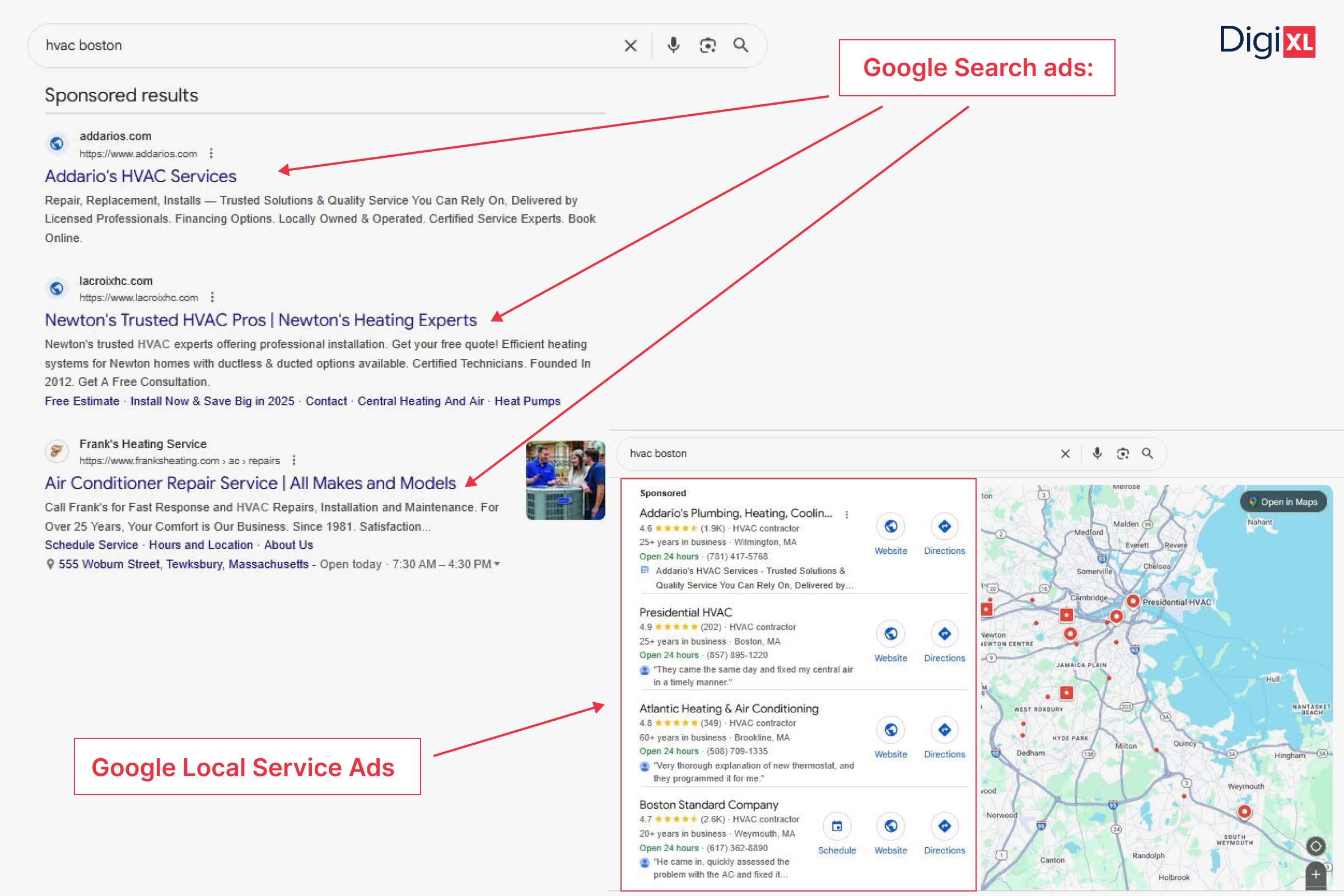
When it comes to local lead generation, Google gives businesses two powerful PPC campaign options: Google Local Services Ads vs. Search Ads
Both can put your business in front of high-intent customers, but they operate differently. LSAs simplify the process through automation and verification, while Search Ads give you granular control over every click.
The question is: which one actually brings better-quality local leads? Let’s break it down.
What Are Google Local Services Ads (LSAs)?
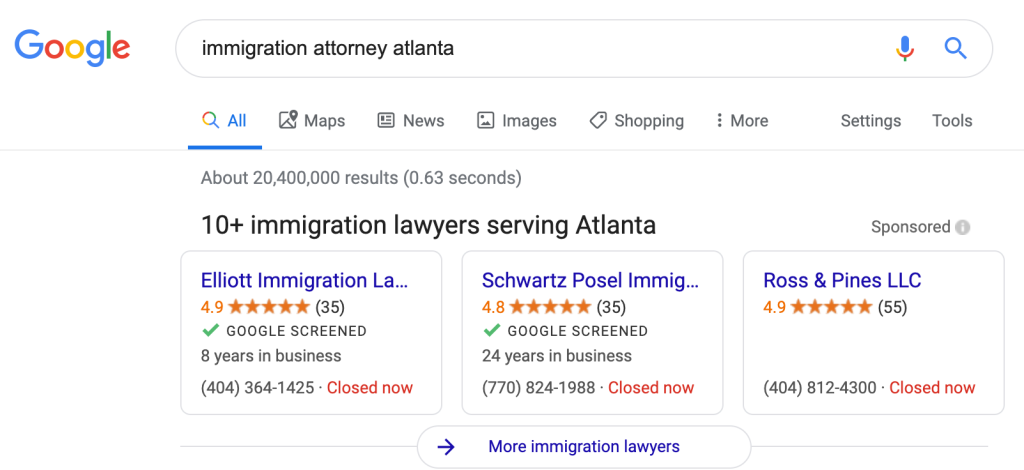
Local Services Ads are designed specifically for service-based businesses, such as plumbers, electricians, real estate agents, lawyers, or HVAC companies.
Instead of paying per click, you pay per lead (calls, messages, or bookings). This model makes LSAs a low-risk entry point for businesses that want to test paid advertising without managing complex keyword structures.
Once your business is verified and approved, Google automatically handles the ad delivery, matching your profile to customers searching for your services in your area.
Key Features:
- Pay-per-lead model, not pay-per-click.
- Automated ad targeting: no keyword research required.
- Google Guarantee badge, which builds trust and visibility.
- Simple setup, ideal for businesses with small teams or limited ad management time.
Getting Started with LSAs: The Pros and Cons
Google’s Local Services Ads (LSAs) were designed to simplify how local businesses connect with potential customers. They reduce much of the manual setup that traditional Google Ads require, no complex keyword lists, no constant bid adjustments, and replace it with a streamlined pay-per-lead system.
But while this simplicity can be a huge advantage, it also means less control over targeting and optimization. Here’s a deeper look into the benefits and drawbacks of using LSAs.
The Pros
1. Fast Setup and Quick Launch
One of the biggest advantages of LSAs is how quickly they can go live. After completing your business verification and background checks (which include license and insurance validation for certain industries), your ads can start showing in just a few days.
Unlike traditional Search campaigns that need keyword research, ad copy creation, and bidding setup, LSAs rely on Google’s automated matching system. Once verified, Google uses your business category and service area to connect you with people actively looking for those services nearby.
This makes LSAs ideal for business owners who need immediate visibility without a steep learning curve.
2. Budget-Friendly Testing
LSAs make it easy to test paid ads without a huge upfront cost. You can start with just a few hundred dollars and monitor how many leads, such as calls, messages, or bookings, you receive.
Because you’re charged per lead rather than per click, your ad budget goes directly toward tangible customer inquiries instead of clicks that may not convert. This setup provides a more predictable cost model for small businesses experimenting with Google Ads for the first time.
If you see positive ROI, you can scale gradually by increasing your weekly budget and service coverage.
3. The Trust Factor: The “Google Guaranteed” Badge
One of the biggest differentiators of LSAs is the Google Guaranteed badge that appears alongside your ad. This badge signals that your business has passed Google’s verification checks and is considered trustworthy.
Customers often interpret this as a “stamp of approval,” which can significantly increase your click-through and conversion rates, especially in competitive industries like home services or law.
In some cases, Google even offers money-back guarantees for customers who are dissatisfied with verified providers, which further boosts consumer confidence.
4. Ease of Use and Low Maintenance
Unlike traditional Search campaigns that require constant keyword monitoring, bid adjustments, and A/B testing, LSAs are relatively hands-off once they’re set up.
Google automatically handles ad delivery, keyword matching, and ranking placement based on your budget, proximity, and reviews.
This makes LSAs a great option for time-strapped small business owners who want results without managing an entire ad account daily.
However, while LSAs are easier to manage, they’re not entirely “set it and forget it.” You’ll still need to monitor your leads, dispute invalid ones, and ensure your business information stays accurate.
The Cons
1. Limited Control Over Targeting and Copy
The simplicity of LSAs comes at a cost, you lose much of the granular control that traditional Search Ads provide.
You can’t:
- Choose or exclude specific keywords.
- Write custom ad copy or experiment with different messages.
- Set detailed bidding strategies or control how Google matches your services to user intent.
Essentially, Google decides when and how your ad appears based on its understanding of your business. While this automation saves time, it can sometimes lead to irrelevant or mismatched leads, especially if Google misinterprets your service categories or location.
2. Heavy Dependence on Reviews
Your ad performance in LSAs is heavily influenced by your reviews and ratings. Businesses with more positive reviews are prioritized higher in search results and often enjoy lower lead costs.
If your profile lacks strong reviews, your visibility can drop significantly, even if your budget is competitive.
That means review management becomes part of your ad strategy. Consistently asking satisfied customers for feedback and promptly responding to negative reviews can directly impact how often your LSA appears.
3. Inconsistent Lead Quality
While LSAs promise pay-per-lead billing, not every “lead” is a qualified one. Some users may submit incorrect information, contact you for unrelated services, or even spam your listing.
Although Google allows advertisers to dispute invalid leads, the process can take time, and refunds aren’t always guaranteed.
Because you have limited control over targeting, it’s crucial to integrate a CRM or call tracking system (like CallRail or HubSpot) to evaluate which leads convert into paying customers. This data helps you identify whether LSAs are truly cost-effective for your business.
4. Limited Availability by Industry and Region
Another major downside is that LSAs are not universally available. Google only supports certain industries and locations at this time.
While coverage has expanded over the years including categories like legal, financial, and home improvement, some service types and smaller markets are still excluded.
Before allocating budget, always confirm whether LSAs are supported for your specific business category and geographic area using Google’s Local Services Ads eligibility checker.
Which One To Choose?
Local Services Ads are a fantastic gateway for local businesses that want fast exposure and a simple setup. They reduce the complexity of Google Ads management while helping small businesses compete with bigger players.
However, they’re not without limitations. LSAs trade customization and control for convenience, so while they can generate quick wins, they work best when paired with Search Ads or Performance Max campaigns for a more balanced and scalable lead generation strategy.
Pro Tip:
Also, connect a CRM or lead tracking tool like CallRail, ServiceTitan, or Housecall Pro to measure conversions beyond the initial lead.
How Google Search Ads Work (and Why They Offer More Control)
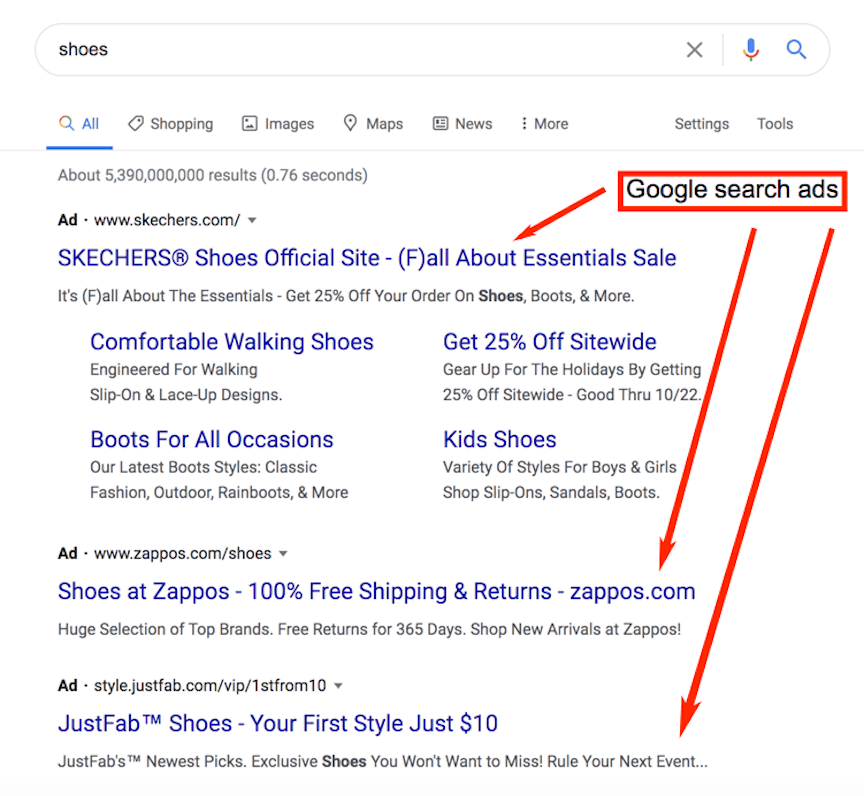
Search Ads are the traditional text ads that appear at the top of Google search results and are built on the pay-per-click model. You decide which keywords to target, how much to bid, and what your ad says.
This control allows advertisers to fine-tune every aspect of their campaigns, but it also demands more strategy, testing, and ongoing management.
Key Features:
- Custom ad copy and extensions for better messaging.
- Keyword-level control, including match types and negatives.
- Flexible bidding strategies like Maximize Conversions or Target CPA.
- Scalability: Ideal for businesses ready to invest and optimize over time.
Search Ads Setup Tips for Local Lead Generation
While Google Local Services Ads (LSAs) simplify the advertising process, Google Search Ads give you precision and control. You decide which keywords trigger your ads, how much you’re willing to pay for a click, and what message you show to potential customers.
That flexibility makes Search Ads incredibly powerful but also more complex. To make them effective for local lead generation, you need a structured, data-driven approach. Here’s how to set up and optimize your campaigns for stronger performance.
1. Start with Phrase and Exact Match Keywords
When launching a new Search campaign, resist the temptation to go broad too early. Begin by targeting phrase match (“keyword”) and exact match [keyword] types.
These match types allow you to control when and where your ads appear ensuring your budget goes toward users actively searching for your exact service or local intent.
For example:
- Phrase match: “plumber near me” may trigger for searches like “24-hour plumber near me.”
- Exact match: [plumber near me] will only trigger when users search for that exact phrase.
This tighter control minimizes wasted spend and helps you understand which search terms actually drive qualified leads. As you gather performance data, you can gradually broaden your targeting.
2. Use Negative Keywords to Eliminate Wasted Spend
Negative keywords are one of the most powerful and often overlooked, features in Google Ads. They prevent your ads from showing for irrelevant or low-intent searches.
For example, if you’re a professional cleaning company, you might want to exclude searches containing:
- “DIY”
- “cheap”
- “jobs”
- “free”
- “how to”
By regularly reviewing your Search Terms Report, you can identify non-converting keywords and add them to your negative list. This fine-tunes your targeting, improves ad relevance, and increases your return on ad spend (ROAS).
Think of it as decluttering your ad strategy, you’re not just chasing traffic, you’re chasing intent.
3. Create Dedicated Landing Pages for Each Service or Location
Your ad copy might be brilliant, but if it leads users to a generic homepage, you’re losing conversions.
Each ad group should direct traffic to a dedicated landing page tailored to the user’s intent, for example:
- “AC Repair in Chicago” → acrepair-chicago.com
- “Plumbing Services in Dallas” → plumbing-dallas.com
Dedicated pages improve your Quality Score, which directly affects your cost-per-click (CPC) and ad ranking.
A strong landing page for local campaigns should include:
- A clear headline matching the ad’s keyword.
- Prominent call-to-action (CTA) buttons (like “Call Now” or “Book a Free Estimate”).
- Trust elements such as testimonials, reviews, and certifications.
- Embedded Google Maps or service area indicators.
- Fast mobile load times since most local searches happen on mobile devices.
Google rewards relevance, and the more aligned your ad-to-landing-page experience is, the lower your costs and the higher your conversion rates will be.
This relevance directly improves your Quality Score, lowering your Cost Per Click (CPC) and boosting your ad rank.
4. Test Ad Copy Variations with A/B Testing
Search Ads give you the flexibility to test multiple headlines, descriptions, and calls to action. Use A/B testing (or Google’s “Responsive Search Ads”) to find which messaging resonates most with your local audience.
For instance:
- Version A: “Licensed Electricians in Austin | 24/7 Service”
- Version B: “Fast, Affordable Electric Repairs | Austin’s Trusted Pros”
Test which ad drives more calls, form fills, or quote requests, then use that data to refine your future ads.
You can also test:
- Different CTAs (“Book Now” vs. “Get a Free Quote”).
- Emotional vs. logical messaging.
- Location mentions in headlines vs. descriptions.
Consistent testing helps uncover the language and tone that triggers action, rather than relying on assumptions.
5. Gradually Expand to Broad Match and Automated Bidding
Once you’ve collected enough conversion data, typically after a few weeks, you can start to broaden your reach and let Google’s machine learning optimize performance.
At this stage, you can:
- Add broad match keywords to capture new variations of your target searches.
- Switch to automated bidding strategies like Maximize Conversions or Target CPA (tCPA).
The data gathered from your initial phrase and exact match campaigns gives Google’s algorithms the context they need to make smart decisions about which clicks are most likely to convert.
For industries with higher CPCs (like legal or home services), you can also use portfolio bidding, combining automated bidding with manual CPC caps to keep costs in check.
6. Budget Expectations: Plan for Consistent Optimization
Unlike LSAs, which you can test with just a few hundred dollars, Search Ads need a more strategic investment.
Expect to allocate a minimum of $500–$1000 per month to gather meaningful data and generate measurable results. Search Ads rely on optimization cycles typically 6 to 8 weeks, before you can evaluate performance with confidence.
During this time, monitor:
- Click-through rate (CTR) to assess ad relevance.
- Conversion rate (CVR) to measure lead quality.
- Cost per conversion (CPA) to gauge efficiency.
Use these metrics to gradually scale your campaign, refine your keyword strategy, and shift budget toward top-performing ads and locations.
Takeaway
Start small and controlled with phrase match and tight targeting, use negative keywords to protect your spend, and build landing pages that convert. Once your data matures, let automation help you scale.
Read more: Maximize Your ROI With Google Responsive Search Ads
Comparing Lead Quality: Google Local Services Ads vs. Search Ads
| Feature | Local Services Ads | Google Search Ads |
| Cost Model | Pay per lead | Pay per click |
| Setup Complexity | Simple, automated | Advanced, manual |
| Lead Control | Limited | Full control |
| Lead Quality | Can vary | Easier to filter and qualify |
| Best For | Small businesses or local tests | Businesses ready to scale |
In general:
- LSAs often generate a higher volume of inquiries (quick calls) but, due to automated targeting, may include unqualified leads.
- Search Ads deliver fewer leads overall, but through precise keyword filtering, they often result in a higher Lead-to-Customer Conversion Rate.
The right choice depends on your priorities: volume vs. precision.
When to Use Both Together
The smartest advertisers don’t choose; they combine both. Running Google Local Services Ads vs. Search Ads side by side can give you the best of both worlds:
- LSAs capture high-intent users who prefer calling directly.
- Search Ads capture users who want to browse, compare, and click through your site.
Use call tracking tools like CallTrackingMetrics or HubSpot to compare:
- Cost per lead
- Lead-to-sale conversion rate
- Customer value over time
If LSA leads tend to be lower quality, shift more budget to Search Ads. If Search Ads are driving expensive clicks but few conversions, boost your LSA budget.
The key is to track, test, and rebalance every few weeks.
Beyond LSAs and Search: Expanding Your Local Ad Strategy
If you have a larger budget or want to dominate your local market, consider testing:
- Performance Max campaigns: These automatically combine your assets to capture high-intent users across Search, Display, Gmail, YouTube, and Maps for a comprehensive, full-funnel local strategy.
- Demand Gen and Video campaigns: Great for building brand awareness and top-of-funnel visibility, especially using YouTube and Discovery feeds.
- Display campaigns: Useful for retargeting users who previously visited your site but didn’t convert, keeping your brand top-of-mind.
When using multiple campaign types, monitor conversion attribution in Google Ads and Google Analytics. Fractional conversions (like $0.3$ from Video + $0.7$ from Search) help you understand how campaigns assist each other in the customer journey and ensure you’re giving credit where it’s due.
Final Verdict: Which One Wins?
There’s no universal winner – Google Local Services Ads vs. Search Ads serve different goals.
- Choose LSAs if you’re new to Google Ads, have limited time for campaign management, or want a predictable cost-per-lead model.
- Choose Search Ads if you need more control, scalability, and in-depth optimization.
- Use both if you want full visibility across Google’s ecosystem, from Maps to search results.
Ultimately, the best results come from testing, tracking, and continuously optimizing both formats to see where your most profitable local leads are coming from.
Loved what you read? There’s more where that came from. Follow DigiXL on Linkedin, X and Facebook for easy, actionable digital marketing tips.
And if you’re ready to grow your local leads fast: Book a 1:1 consultation with our team and let’s build a Google strategy that brings customers straight to your business.
Frequently Asked Questions (FAQs)
1. How do I know if my business qualifies for Google Local Services Ads?
Google LSAs are available only for specific service-based industries like legal, home repair, real estate, and wellness. Eligibility depends on your business category, location, and verification status (license, insurance, background check, etc.). You can check availability through Google’s Local Services setup page.
2. Why am I not getting leads even though my LSAs are live?
Several factors can affect your visibility such as low review count, incomplete business profile, poor response rate, or budget exhaustion. LSAs rank ads based on proximity, responsiveness, and review quality, so keeping your profile active and well-rated is key.
3. Can I track conversions from LSAs the same way I do in Google Ads?
Not exactly. LSAs provide call and message tracking directly in the dashboard, including call recordings and lead dispute options. However, unlike Search Ads, you can’t add conversion tags or connect LSAs to Google Analytics. It’s best to monitor both platforms separately for accuracy.
4. How do I handle low-quality or spam leads from LSAs?
Google allows you to dispute invalid leads (for example, wrong service type or outside your area) through the LSA dashboard. While it can take a few days for approval, successful disputes usually result in credit refunds to your account.
5. Can I run LSAs and Search Ads under the same Google account?
Yes and you should. Running both under one account helps unify your billing and performance tracking. Plus, it gives you insights into which ad type delivers better cost per qualified lead, allowing you to shift budgets accordingly.
6. What’s the best way to optimize my Search Ads for local intent?
Focus on geo-specific keywords (like “plumber in Bandra” or “lawyer near Pune”), enable location extensions, and create service-specific landing pages. Also, use call-only ads if most leads come through phone calls, they often deliver faster ROI for local businesses.
7. How important are reviews for ad performance overall?
Very. For LSAs, reviews are a direct ranking factor. For Search Ads, they indirectly influence click-through rates when featured in extensions or ad copy. Regularly request verified Google reviews and respond to each one, it signals trust and engagement.
8. Should I rely on automated bidding for local Search Ads?
Automated bidding (like “Maximize Conversions”) works well after you’ve collected enough conversion data. When starting out, use manual or enhanced CPC to maintain control, then shift to automation once Google understands your lead patterns.
9. How long before I see results from LSAs or Search Ads?
LSAs can deliver qualified leads within a few days of approval, while Search Ads usually need 6–8 weeks of consistent optimization to hit stable performance. Patience and ongoing fine-tuning are key to achieving sustainable ROI.
10. Should I pause my Search Ads once LSAs start performing well?
Not necessarily. LSAs and Search Ads target slightly different audiences and user intents. Pausing one can reduce total visibility on Google’s results page. Instead, monitor performance data monthly and reallocate budget strategically rather than stopping one entirely.